AI Coding Live News

Fireworks Forge Launches: Ultra-fast Inference Preview Hits 1,500 Tokens/s, Half-Price Background Mode, Nexus Desktop for Codex and Claude Desktop, Sovereign Private Preview

At its first Forge conference on November 3, open-model inference platform Fireworks launched a batch of products. Ultra-fast, powered by NVIDIA Blackwell, is in public preview at up to 1,500 tokens per second on DeepSeek V4.1 Flash, cutting a 30-turn agent task from 1 minute to 8 seconds. Background Mode runs deferrable work at half price, alongside multi-day prompt caching and higher rate limits. Nexus Desktop brings open-model routing into the Codex app, Claude Desktop and OpenCode, with Pro plans from $8 per month. Fireworks also announced No Eval, serverless LoRA inference, the Fireworks Sovereign private preview and a 60+ partner Frontier Ecosystem.
Fireworks Forge Launches: Ultra-fast Inference Preview Hits 1,500 Tokens/s, Half-Price Background Mode, Nexus Desktop for Codex and Claude Desktop, Sovereign Private Preview

Key Takeaways

  • Ultra-fast public preview: on NVIDIA Blackwell, up to 1,500 tokens per second on DeepSeek V4.1 Flash; in Fireworks' benchmark a 30-turn agent task fell from 1 minute to 8 seconds (Fireworks blog)
  • Cost options: Background Mode runs deferrable work at half price; multi-day prompt caching cuts the cost of resuming long context; higher serverless rate limits and Elastic Burst are generally available
  • Nexus Desktop launches: personalized routing across open and closed models inside the Codex app, Claude Desktop and OpenCode; Pro from $8 per month, Teams from $10 per seat per month
  • Training: No Eval (private preview) turns production traces into task evals; serverless LoRA inference (public preview) starts with GLM 5.3 Flash at per-token pricing with no idle charge; free training on Muse Glimmer 30B through November 30
  • Enterprise: Fireworks Sovereign (private preview) runs the inference engine in a customer's own cloud or data center; Fireworks says it already manages over 25,000 GPUs in customer environments; plus a 60+ partner Frontier Ecosystem
Read full story

Codex 28-day run, day 27: OpenAI's Tibo posts "Banked 1/2" as the first of two saved usage resets lands

At 00:43 UTC on Nov 1, Tibo (@thsottiaux), who works on Codex and ChatGPT at OpenAI, posted "Banked 1/2" on X; the post has about 6,860 likes and 660K views. In his day 26 post the day before he had teased that "next two days will be resets… banked…", so this is day 27 of his 28-day run: the first of two Codex usage resets you can save and use when you choose. According to OpenAI's Help Center, a banked reset does not refresh usage on arrival; you redeem it in desktop Settings > Usage & billing, web Usage settings, or /usage in the CLI. Eligible plans and the expiry for this particular offer have not been published.

Key Takeaways

  • Source: Tibo's own X post "Banked 1/2" (00:43 UTC, Nov 1), with about 6,860 likes, 1,066 replies and 660K views as of 15:10 SGT
  • Context: his day 26 post (about 14K likes) teased "next two days will be resets… banked…", so a second one is expected on day 28
  • Where to redeem: desktop Settings > Usage & billing, web Usage settings, or /usage then Redeem reset in Codex CLI; not available in the mobile app (OpenAI Help Center)
  • Rule: at least one covered allowance must be below 80% remaining; Plus and Business Standard get the 5-hour and weekly allowances back, Pro 100/200/500 the weekly allowance, and Go the monthly allowance
  • Caveat: using one restarts the usage period from that day; eligible plans and the expiry for this offer have not been published, so check your account
Read full story
Linked Models & Agents:

ChatGPT adds account switching: stay signed in to up to 2 accounts, rolling out on iOS and Android, desktop coming soon

On October 31, Tibo (@thsottiaux), who works on Codex and ChatGPT at OpenAI, announced on X, as day 26 of his daily shipping posts, that ChatGPT mobile now supports switching between accounts, with desktop coming soon. OpenAI's updated Help Center article says users can stay signed in to up to 2 accounts with one active at a time; chats, memory, files, subscriptions, billing and workspaces stay separate, and switching never moves or merges data. The post drew about 10,000 likes and 1.36M views.

ChatGPT adds account switching: stay signed in to up to 2 accounts, rolling out on iOS and Android, desktop coming soon

Key Takeaways

  • Limit: up to 2 signed-in accounts, one active at a time; with 2 signed in you must log out of one before adding another, per the OpenAI Help Center
  • Platforms: the Help Center says web plus the iOS and Android apps, with mobile rolling out gradually (Settings, then Switch account); Tibo says the desktop app is coming soon
  • Isolation: chats, memory, files, subscriptions, billing and workspaces are not shared, and switching never moves chats or merges accounts; a newly created second account starts on the Free plan
  • Notifications: mobile can show notifications for both accounts, and tapping one for the other account switches to it, so check the active account before pasting work context
  • Reach: Tibo's post had about 10,120 likes and 1.36M views (public X metrics as of Oct 31, 12:00 UTC); he also teased banked usage resets over the next two days
Read full story
Linked Models & Agents:

Vercel Labs launches agent-desktop: computer use for any coding agent via OS accessibility trees, not pixels, on macOS, Windows and Linux

On October 31, Chris Tate of Vercel Labs, creator of agent-browser, announced agent-desktop on X as "agent-browser, for your whole computer". It is an Apache-2.0 Rust CLI and C library that reads a desktop app's OS accessibility tree and returns every actionable element as a JSON ref; the agent clicks or types on a ref and snapshots again to verify, with no pixel matching, headless by default. Version 1.0.0 shipped on October 27 and added Linux support; the current npm release is 1.0.2.

Vercel Labs launches agent-desktop: computer use for any coding agent via OS accessibility trees, not pixels, on macOS, Windows and Linux

Key Takeaways

  • Install: npm install -g agent-desktop, one package with native x64/ARM64 binaries; 1.0.0 (Oct 27) added Linux (glibc 2.35+, via AT-SPI), and the latest npm release is 1.0.2 (Oct 30)
  • Loop: snapshot prints a JSON tree with refs, click @<snapshot_id>:eN acts, then snapshot again to verify; a changed UI returns STALE_REF, and errors say whether a retry is safe
  • Scope: the README lists 60 command names, 56 of them operational, spanning windows, keyboard and mouse, notifications, clipboard, waits and session traces
  • Headless by default: ref actions go through accessibility APIs without moving the pointer or stealing focus, with --headed for physical input; Chris Tate says multiple agents can use the computer in parallel, each with its own cursor
  • Benchmarks: no official success-rate or speed numbers; it is a tool with no model inside, and web pages stay with agent-browser
Read full story
ADSponsored
A
Anthropic@AICoder·
👀94
🔥80

Claude Code 2.1.314 adds a block on writes outside working directories, IdP group routing for the apps gateway, and idle compaction in VS Code and Desktop

Anthropic published Claude Code v2.1.314 on GitHub at 01:06 UTC on Oct 30. The official CHANGELOG lists 119 entries, more than half of them fixes. The new features lean enterprise: permissions.blockWritesOutsideWorkingDirectories makes Write, Edit and NotebookEdit refuse paths outside the working directories in every permission mode; Claude apps gateway upstreams can be limited to IdP groups, and Bedrock upstreams can log which guardrail fired; idle compaction now also runs in VS Code and the Code tab of Claude Desktop. It also fixes sessions failing repeatedly when an admin caps effort, and claude -p exiting 0 with no output when startup failed.

Key Takeaways

  • Size: the official v2.1.314 CHANGELOG has 119 entries, more than half of them fixes; released at 01:06 UTC on Oct 30
  • Safety: the new permissions.blockWritesOutsideWorkingDirectories setting stops Write, Edit and NotebookEdit from writing outside the working directories in every permission mode
  • Enterprise gateway: upstreams take an optional groups list so only developers in those IdP groups are routed there, failover included; Bedrock upstreams gain guardrail_trace
  • Experience: idle compaction now runs in VS Code and the Claude Desktop Code tab, summarizing idle conversations above 200K tokens
  • Fixes: when an admin caps effort, Claude Code lowers it and retries; a failed claude -p startup now prints the error and exits 1
Read full story
Linked Models & Agents:

ChatGPT adds iCloud Mail and iCloud Calendar plugins on all plans, connected with an Apple app-specific password

On Oct 27 the official ChatGPT account announced that iCloud Mail and iCloud Calendar plugins are available in ChatGPT on all plans across web, desktop and iOS, rolling out globally. Users can ask ChatGPT to find an email, catch up on their inbox, check what is next or update a calendar event. The two plugins are installed separately, both connect with an Apple app-specific password, and both include read-only contact lookup; standalone Contacts and Reminders plugins are not part of this launch.

ChatGPT adds iCloud Mail and iCloud Calendar plugins on all plans, connected with an Apple app-specific password

Key Takeaways

  • Available on every ChatGPT plan, including Free, on web, desktop and iOS, rolling out globally and subject to workspace app controls
  • Found under Settings > Plugins; iCloud Mail and iCloud Calendar are installed and connected separately
  • Both connect with an Apple app-specific password, which requires two-factor authentication; never use the main Apple password or paste it into a chat
  • Mail only works with @icloud.com, @me.com and @mac.com addresses, while Calendar uses the primary Apple Account email, which may differ
  • Disconnecting in ChatGPT does not revoke the app-specific password at Apple; that has to be done separately at account.apple.com
Read full story
Linked Models & Agents:

CapCut announces a ChatGPT plugin is coming soon, bringing its video generation and editing tools inside ChatGPT with drafts that move to the CapCut web editor

At 18:34 UTC on 2026-10-24, during its CapCut World event in Los Angeles, ByteDance's CapCut announced from its official account (@capcutapp) that a new CapCut plugin is coming soon to ChatGPT (post). According to CapCut, the plugin brings its video editing and generation tools inside ChatGPT: users can start with an idea in ChatGPT, create it with the plugin right in the chat, then move the draft to the CapCut web editor to refine and publish. When we pulled it, the post had about 3,646 likes, 319 reposts, 504 replies and 450K views. The event site lists OpenAI's Head of Partnerships Mahak Sharma and Head of Creator Product Sam Yam as speakers. Many creator posts on X say the plugin is already in early access on ChatGPT desktop with mobile and web around mid-November, but CapCut's own post still says coming soon, so timing and pricing should be taken from CapCut's later announcements.

Key Takeaways

  • Official source: CapCut's post on X, published 18:34 UTC on 10-24, with about 3,646 likes, 319 reposts, 216 quotes, 504 replies and 450K views when we pulled it
  • What it does: CapCut's video editing and generation tools inside ChatGPT, so a chat idea can become a video draft directly
  • Workflow: drafts made with the plugin can move to the CapCut web editor for further editing, sharing and publishing
  • OpenAI involvement: the CapCut World Los Angeles site lists OpenAI's Mahak Sharma (Head of Partnerships) and Sam Yam (Head of Creator Product) as speakers
  • Status: CapCut says coming soon; creator claims of desktop early access now and mobile and web in mid-November are not confirmed by CapCut, and pricing is not announced
Read full story

Cursor launches Computer Use: agents can control your computer and drive desktop apps like the iOS Simulator to test what they build

On 2026-10-23 (15:59 UTC) the official Cursor account @cursor_ai announced "Cursor can now control your computer": agents can drive desktop apps such as the iOS Simulator to test the features they build. A follow-up post says Computer Use lets agents click and type across any app on your computer, not just the browser. Cursor turns it on by itself when a task needs it, and you can also request it by @-mentioning Computer Use in your prompt; updating Cursor is enough to try it. A community changelog in September mentioned Computer Use on Mac in version 3.20.21, and this is the official launch. Supported platforms, the permission model and benchmarks were not published.

Cursor launches Computer Use: agents can control your computer and drive desktop apps like the iOS Simulator to test what they build

Key Takeaways

  • Cursor officially says its agents can now control your computer and drive desktop apps like the iOS Simulator to test the features they build
  • Computer Use lets agents click and type across any app, not just the browser
  • Cursor uses it automatically when a task needs it, and you can request it by @-mentioning Computer Use in a prompt
  • Update Cursor to try it; supported platforms, the permission model and benchmarks were not published
Read full story

Kimi teaser video shows the model name Kimi K3.1: Kimi Code terminal reads "K3.1 thinking: high" while generating a Three.js 3D scene

On 2026-10-23 (01:41 UTC) the official Kimi account @Kimi_Moonshot posted a 24-second, retro-CRT-style video with no caption text. The Kimi Code terminal at the start of the clip reads "Model: Kimi K3.1" and "Version: 2.2.0", the status bar shows "Kimi K3.1 thinking: high", and a notice says "Kimi Code Desktop is here". The user then types "Build a complex procedural 3D scene in Three.js." and the model calls the Write tool to create ./scene.js. This is the first time the Kimi K3.1 name has appeared in official material. The post has no caption and no release date, benchmark, price or parameter details, so this is a teaser and not a confirmed release.

Kimi teaser video shows the model name Kimi K3.1: Kimi Code terminal reads "K3.1 thinking: high" while generating a Three.js 3D scene

Key Takeaways

  • In the official teaser the Kimi Code terminal shows "Model: Kimi K3.1" and the status bar reads "Kimi K3.1 thinking: high", the first official appearance of the K3.1 name
  • The clip also shows Kimi Code version 2.2.0 and the notice "Kimi Code Desktop is here", with install via the /desktop command or kimi.com/code
  • The demo task is "Build a complex procedural 3D scene in Three.js." and the model uses the Write tool to create ./scene.js, in a clip of about 24 seconds
  • The post has no caption; release date, benchmarks, price and parameters are not officially announced, so treat this as a teaser and not a release. As of the evening of 10-23 SGT the post had about 1.63M views and 17.6K likes (public X counts)
Read full story

Perplexity Computer Launches Natively on macOS: Full On-Device Model and Agent Execution Without Cloud Roundtrips

Perplexity officially unveiled that Perplexity Computer now operates 100% locally on macOS through the native desktop application. Breaking away from cloud-dependent computer-use paradigms that ship continuous video feeds across the internet, Perplexity Computer executes both the underlying inference model and the agent orchestration runtime directly on local Mac silicon. By interfacing natively with macOS Accessibility APIs, the system eliminates network latency, guarantees complete screen privacy, and empowers autonomous desktop copilots to orchestrate multi-application workflows entirely offline.

Perplexity Computer Launches Natively on macOS: Full On-Device Model and Agent Execution Without Cloud Roundtrips

Key Takeaways

  • Perplexity launched Perplexity Computer inside the native macOS app, hosting both model inference and agent loops locally
  • Eliminates privacy vulnerabilities of cloud-based GUI agents by keeping all screen frames and keystrokes strictly on-device
  • Achieves near-instantaneous interaction latency leveraging Apple Silicon unified memory and the Neural Engine
  • Seamlessly interfaces with native macOS Accessibility APIs and app sandboxes for cross-application workflow automation
Read full story
ADSponsored

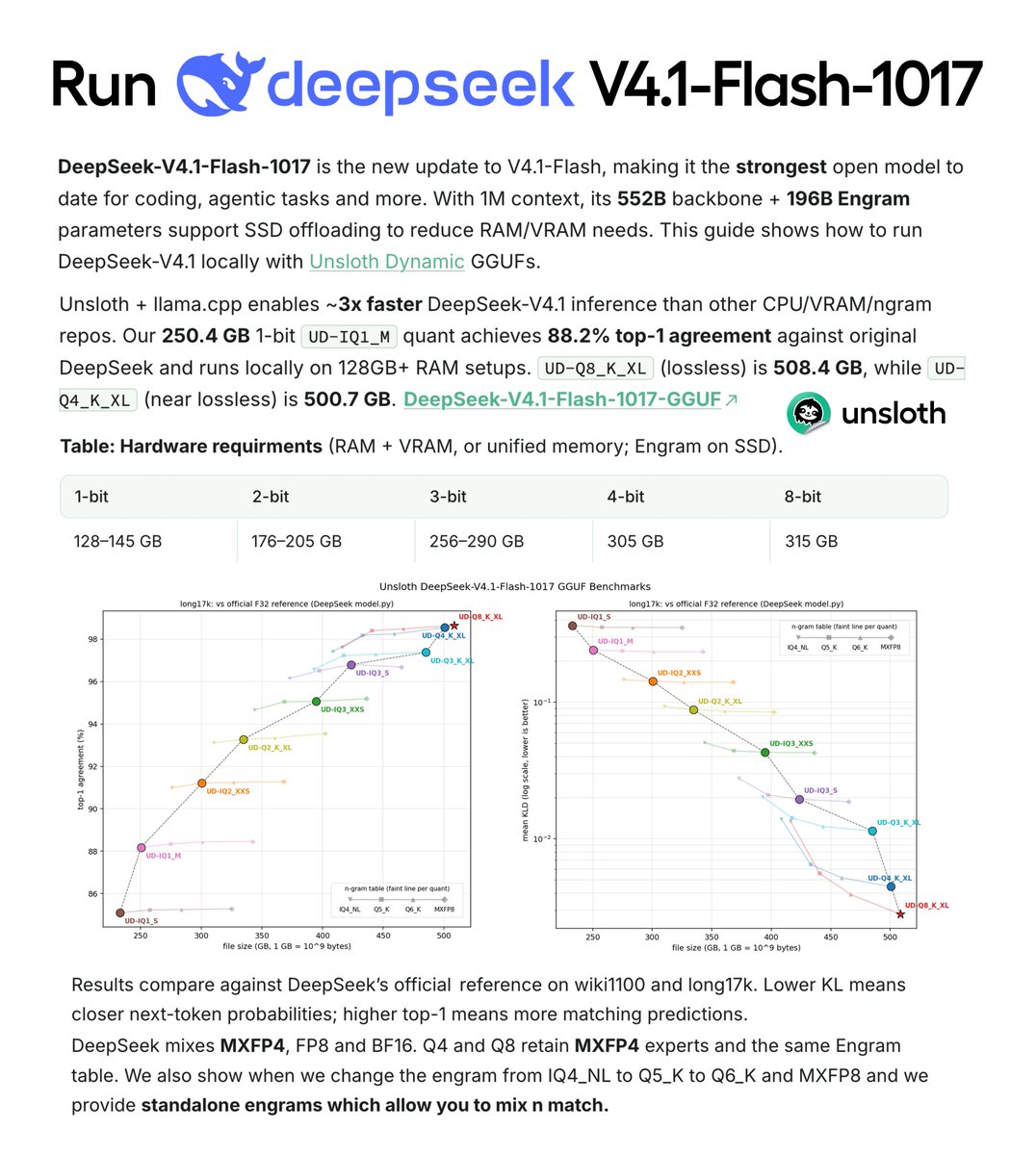
Unsloth ships DeepSeek-V4.1-Flash-1017 dynamic GGUFs: a 250 GB 1-bit quant runs on 128 GB+ RAM, with the Engram table offloaded to SSD

On Oct 19 (UTC) Unsloth released dynamic GGUF quants and a run-locally guide for DeepSeek-V4.1-Flash-1017. Per Unsloth, the 1-bit UD-IQ1_M quant is 250.4 GB (vs 508.4 GB for lossless Q8), keeps 88.2% top-1 agreement with the official weights on long17k, and runs on 128 GB+ RAM machines, because the model's 110.6–202.8 GB Engram n-gram table can stay on SSD via mmap. Running it currently requires Unsloth's llama.cpp PR build or Unsloth Desktop.

Unsloth ships DeepSeek-V4.1-Flash-1017 dynamic GGUFs: a 250 GB 1-bit quant runs on 128 GB+ RAM, with the Engram table offloaded to SSD

Key Takeaways

  • 1-bit UD-IQ1_M is 250.4 GB, about 51% smaller than lossless UD-Q8_K_XL (508.4 GB), with 88.2% top-1 agreement on long17k and 87.1% on wiki1100 (Unsloth-reported)
  • The smallest UD-IQ1_S (233.0 GB) targets 128 GB RAM machines such as a Mac or DGX Spark at 82.8–85.1% agreement; 3-bit UD-IQ3_XXS needs ~256 GB (e.g. Mac Studio) at 94.6–95.1%
  • The model pairs a 552B backbone with 196B Engram parameters; the 110.6–202.8 GB Engram n-gram table can stay on SSD via mmap, saving RAM but not disk
  • Unsloth claims ~3x faster inference than other CPU/VRAM/ngram-focused repos on top of llama.cpp (vendor claim, no independent test yet)
  • The Hugging Face repo is MIT-licensed with 9 quant levels from IQ1_S to Q8_K_XL plus standalone Engram files at different precisions
Read full story
Linked Models & Agents:

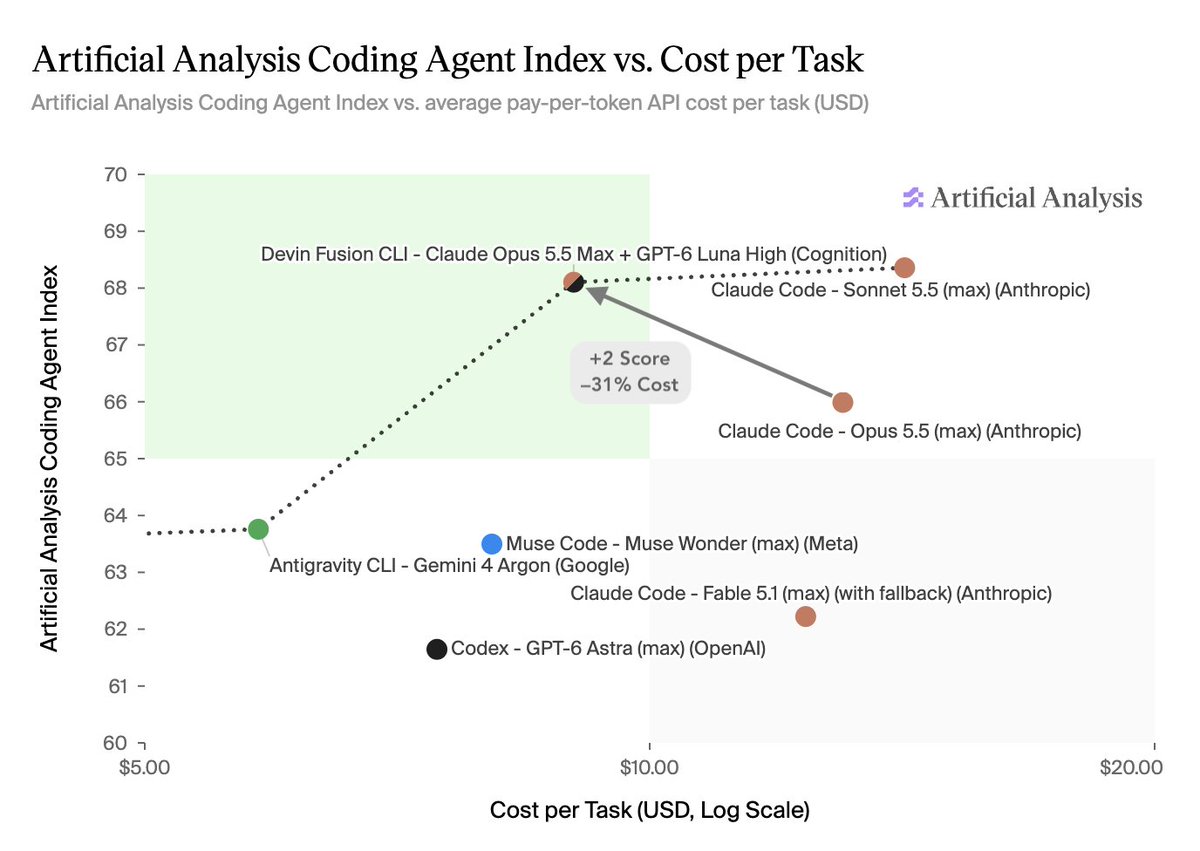
Devin Fusion with an Opus 5.5 lead and GPT-6 Luna sidekick tops the Artificial Analysis Coding Agent Index at 68.1, at what Cognition says is 31% lower cost per task than Claude Code with Opus 5.5

Cognition said on October 19 that Devin Fusion, pairing Claude Opus 5.5 as the lead with GPT-6 Luna as the sidekick, scored 68.1 on the Artificial Analysis Coding Agent Index v1.5. Artificial Analysis's current data puts it first, but only 0.1 ahead of Muse Code with Muse Wonder Full at 68.0, effectively a tie; Antigravity CLI with Gemini 4 Argon is third at 63.8. Cognition says the pairing costs 31% less per task than Claude Code with Opus 5.5 (vendor-reported). Fusion ships in Devin CLI and Desktop.

Devin Fusion with an Opus 5.5 lead and GPT-6 Luna sidekick tops the Artificial Analysis Coding Agent Index at 68.1, at what Cognition says is 31% lower cost per task than Claude Code with Opus 5.5

Key Takeaways

  • 68.1 overall: DeepSWE v1.1 72.6, SWE-Atlas-QnA 69.6, Terminal-Bench v4 62.1, equally weighted (Artificial Analysis data).
  • Just 0.1 ahead of Muse Code with Muse Wonder Full (68.0); Antigravity CLI with Gemini 4 Argon 63.8, Codex with GPT-6.1 Sol (xhigh) 62.9.
  • Cost: Cognition says 31% lower per task than Claude Code with Opus 5.5 (vendor-reported).
  • Earlier, Fusion with Fable 5.1 + SWE-2 cut DeepSWE 1.1 cost per task from $14.63 to $7.88 (-46%) while scoring 63.1 vs 64.3.
  • Recommended pairing is Opus 5.5 + GPT-6 Luna, available by installing Devin CLI.
Read full story

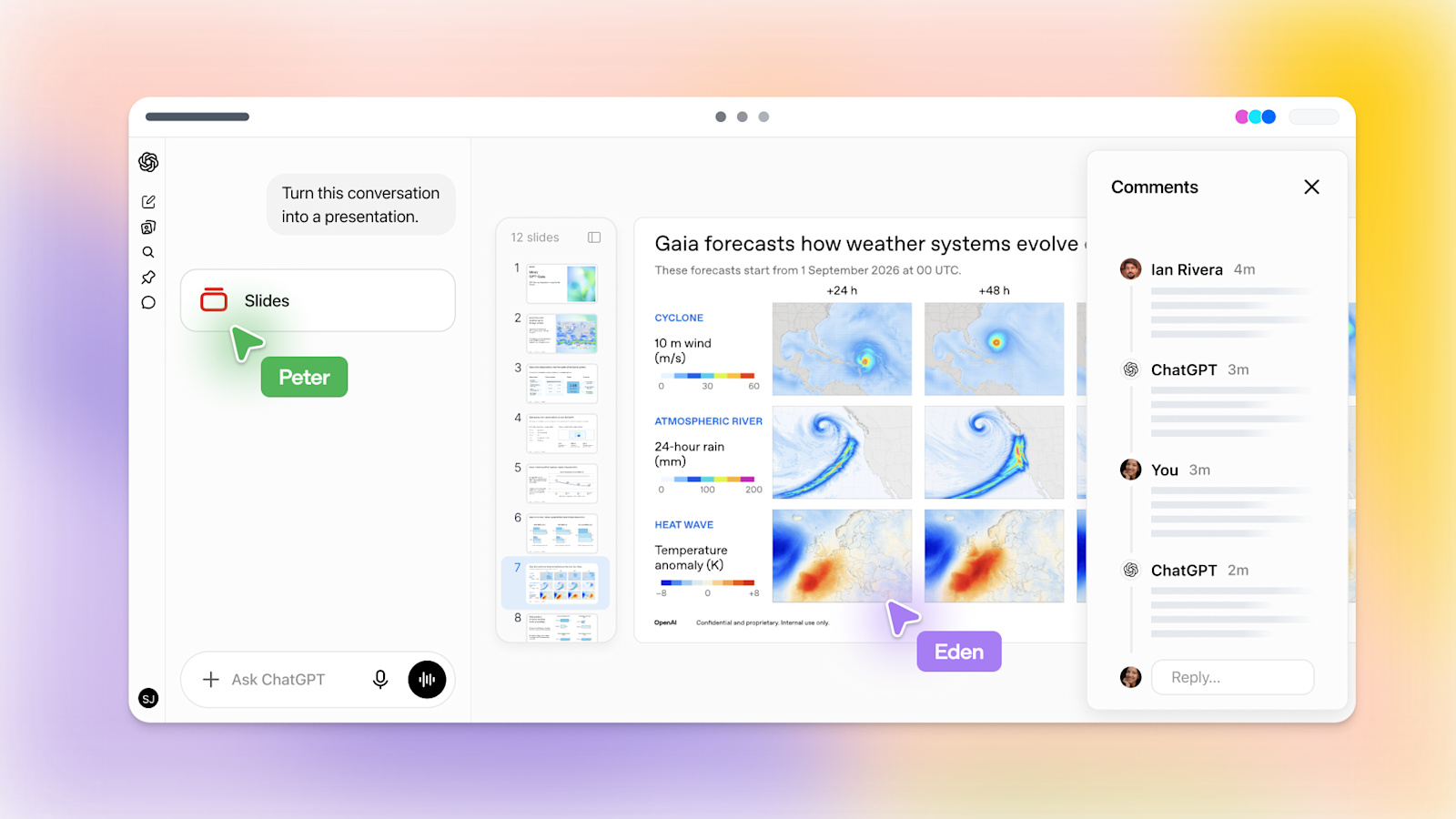
OpenAI rolls out ChatGPT Slides: real-time collaborative decks in Space, exportable to PowerPoint, PDF and Google Slides

Starting Oct 16, OpenAI is rolling out ChatGPT Slides on web and desktop to Pro, Business and Enterprise users with Space access. Ask ChatGPT in Work to turn a conversation, files or an outline into an editable deck, or share an example deck to set the style; teammates co-edit in real time, leave shared comments and @mention ChatGPT for edits. The web app exports to PowerPoint, PDF and Google Slides, and the desktop app can open decks in PowerPoint or Keynote.

OpenAI rolls out ChatGPT Slides: real-time collaborative decks in Space, exportable to PowerPoint, PDF and Google Slides

Key Takeaways

  • Rolling out from Oct 16 to 3 plans (Pro, Business, Enterprise) with Space access; Plus and Free are not in this wave
  • 3 web export targets: PowerPoint (.pptx), PDF and Google Slides; desktop opens decks in PowerPoint or Keynote
  • Share an example deck to guide layout, build templates with template-creator and share them via team Plugins
  • Real-time co-editing and shared comments; @mention ChatGPT or your dot to have the agent edit. Help Center says comment-only access is not available at launch
  • On Windows without the MXC component (unsupported on Windows 10) local desktop editing falls back to .pptx files; no official quality benchmarks
Read full story
A
Anthropicgithub.com·
👀134
🔥87

Claude Code 2.1.302 turns on fork subagents by default across claude -p, Agent SDK, desktop and VS Code; standalone Claude Design closes Dec 14

Claude Code v2.1.302 (Oct 16) makes fork subagents the default in claude -p, the Agent SDK, desktop and VS Code, starts permission-mode-less headless sessions on third-party providers in default mode, and adds CLAUDE_CODE_AUTO_MODE_MODEL. It also flags that standalone Claude Design (claude.ai/design) closes on Dec 14, 2026; design systems must be migrated to Claude Artifacts, while chats and comments are not carried over.

Key Takeaways

  • Fork subagents now default-on in claude -p, Agent SDK, desktop and VS Code; disable with CLAUDE_CODE_FORK_SUBAGENT=0
  • Headless sessions with no permission mode on third-party providers start in default mode (telemetry off or fresh install); --permission-mode auto keeps auto
  • New CLAUDE_CODE_AUTO_MODE_MODEL picks the client-side auto mode classifier model; prompt/agent hooks capped at 12 concurrent per event
  • Read tool refuses image sources over 128 MB; MCP servers on protocol 2026-07-28 that omit resultType/ttlMs/cacheScope no longer break
  • Standalone claude.ai/design closes Dec 14, 2026; chats, comments and public links are not migrated and originals are deleted afterward
Read full story

Claude Code desktop reworks multi-session flow: saved environments, nested parallel sessions, /btw side tabs and a needs-you sidebar

On 2026-10-14 (UTC) ClaudeDevs announced a Claude Code desktop update built for running many sessions side by side: a new-session screen with recent folders, saved environments (several folders, an SSH host or the cloud) with an optional worktree per folder, nested sessions for parallel tasks that report only results back to the main thread, one-click follow-up sessions, /btw side questions in their own tab, and a sidebar that separates working sessions from ones that need you, plus a live to-do list, recap cards and a side rail showing where a session runs, its context and its changes. Update the desktop app to get it; Anthropic published no performance numbers.

Claude Code desktop reworks multi-session flow: saved environments, nested parallel sessions, /btw side tabs and a needs-you sidebar

Key Takeaways

  • 6-post official thread; the lead post had about 15.8K likes and 1.31M impressions at fetch time
  • Parallel work: each task Claude runs in parallel becomes a nested session that reports only its result back, keeping the main thread readable
  • Saved environments: folders, an SSH host or the cloud, with an optional Git worktree per folder (default <project-root>/.claude/worktrees/)
  • Attention: sidebar splits working vs needs-you sessions; live to-do, recap card on hand-off; /btw (or Cmd+;) side questions stay out of the main history
  • No benchmarks published; users already ask to un-nest forked sessions in the sidebar (GitHub issue #100216)
Read full story